Goal Setting Worksheet Template (Printable PDF & GoodNotes)
A one-page goal planner. Write the goal, why it matters, a deadline and how you'll measure it, then break it into dated milestones and a few small first steps.
- Printable US Letter8.5 × 11 in, white paper
- Printable A4210 × 297 mm, white paper
- iPad / GoodNotesAlso Notability and Noteshelf
- E-ink tabletreMarkable, Kindle Scribe, Boox
Free PDF, 1 page, undated. No sign-up needed.
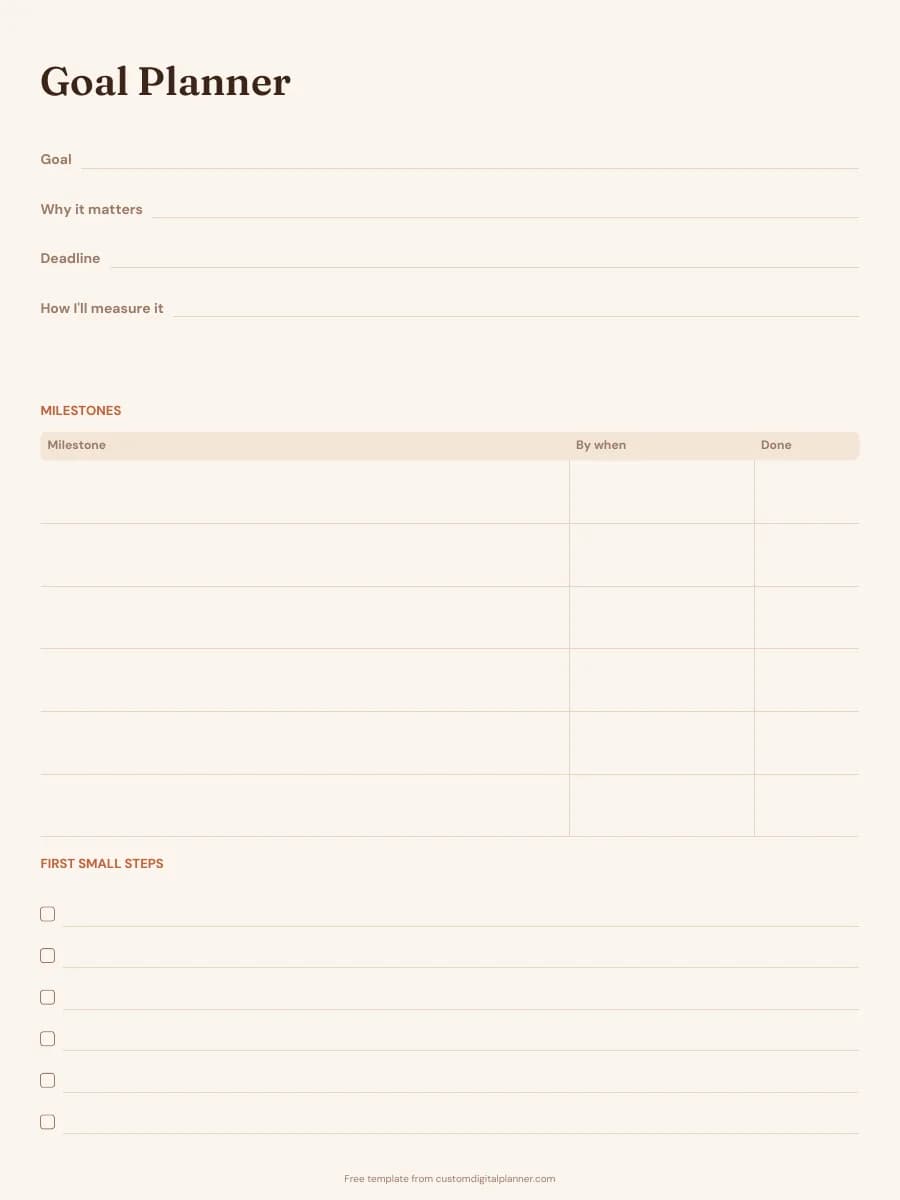
Shown for iPad in the Terracotta Sun theme. Printable downloads use white paper; the e-ink version is black and white.
One page, ready to fill in.
- Write-in lines for the goal, why it matters, the deadline and how you'll measure it
- A milestones table with "By when" and "Done" columns
- A "First small steps" checklist
Getting the most from a goal setting worksheet.
Use the top four lines as a SMART check
The goal line should be specific, the measure line makes it measurable, the why line keeps it relevant and the deadline makes it time-bound. When you set the deadline, ask whether it's achievable with the time you really have. If you can't fill the measure line, the goal isn't specific enough yet.
Work backwards to set milestones
Start from the deadline and ask what has to be true halfway there, then a quarter of the way there. Put a date in the "By when" column for each, so every milestone has its own small deadline.
Make the first steps tiny
The first steps list is for actions you could do this week in under an hour: book the class, open the savings account, buy the running shoes. Getting started is the hard part, so make it easy.
Use one worksheet per goal
A separate page for each goal keeps milestones from getting mixed up. Working on two or three goals at once is easier to keep up than five or six.
Review it once a month
Tick milestones in the Done column as you reach them, and move dates honestly if you fall behind. A goal with a later deadline is still a goal.
Included in 21 planners
This template is a page in each of these planners. Open one to see everything else that comes with it.
- All-in-One Life Planner
- Weekly Planner
- Goal Planner
- Academic Planner (Aug–Jul)
- Teacher Planner
- Budget Planner
- Small Business Planner
- Etsy & Online Shop Planner
- Content Creator Planner
- Bible Study & Faith Planner
- Christian Planner
- Homeschool Planner
- Teen Planner
- Wedding Planner
- Party Planner
- Graduation Party Planner
- Reading Journal
- Habit Tracker Planner
- Work & Project Planner
- Real Estate Agent Planner
- Undated Planner
Get it inside a full hyperlinked planner
The goal planner includes this page alongside dated month and week pages for your year, with side tabs and links between every page. Pick your device and theme, preview it free, and pay only when it's right.
- Dated pages for the whole year
- Tap a tab or a date to jump there
- GoodNotes, Notability, Samsung Notes, e-ink and print sizes
Or read about the goal planner first.
About this goal setting worksheet template
Need help importing it? See devices and apps or the FAQ.
Is this goal setting worksheet template free?
Yes. Every download on this page is free and doesn't need an account or an email address. Print it or import it as often as you like for your own use.
Is this a SMART goal worksheet?
It covers the same ground. The goal, why, deadline and measure lines match specific, relevant, time-bound and measurable, and the milestones table is where you check that it's achievable.
Can students and teens use it?
Yes. It works for school goals like raising a grade, finishing a project or preparing for an exam. Older students can fill it in alone; younger ones may want help breaking the goal into milestones.
How do I use it in GoodNotes or Notability?
Download the iPad / GoodNotes version. In GoodNotes, tap + then Import and choose the PDF; in Notability, tap Import and pick it from Files. To reuse a page, duplicate it from the page thumbnails instead of downloading it again.
How does the full goal planner help?
In the builder you type a goal and the AI breaks it into a milestone for each month and a small action for each week, then prints them on your month and week pages. You can read and edit every line before you download.