An AI goal planner that writes your milestones into the pages
Type up to six goals. AI breaks each one into a milestone for every month and a small action for every week, adds a short motto for each month, and prints it all on your planner's goals, month and week pages. You can edit every line before you download.
AI planning and the preview are free within daily limits. Downloading the planner is $12, or included in Pro and Seller.
How it works, in three steps.
- 1
Type your goals
Add up to six goals in the builder's Goals step, each with an optional reason and deadline, such as “Run my first 10K” by October.
- 2
Let AI plan the year
In about 10 to 25 seconds you get a milestone for each month and an action for each week, timed around any deadline. Read them and change anything that doesn't fit.
- 3
Preview and download
Flip through the pages free in your browser. Milestones sit on the goals and month pages; actions sit on each week page.
What it does, and what it doesn't.
It does
- Writes one concrete milestone per goal for every month of the planner
- Writes one short action per goal for every week, lined up with that month's milestone
- Plans around any deadline you give, then switches to keeping things going once it has passed
- Adds a short, original motto under each month's title
- Lets you edit every milestone, action and motto, and plan again if you change a goal
- Keeps health and money goals sensible: it's told never to suggest calorie targets or crash diets
- Sends only your goals (with any reason and deadline) and basic planner details to the AI, not your name or email
It doesn't
- Coach you or check in. It writes the plan once; the doing and ticking off is yours
- Replace professional advice. For medical, financial or training plans, check the steps with someone qualified
- Design the pages. Layouts, links and dates come from our planner engine, so they're always exact
- Track your progress. Ticks and notes stay in your notes app
- Run without limits: 3 plans a day without an account, 6 with a free account, 60 on Pro and 120 on Seller
What a plan looks like.
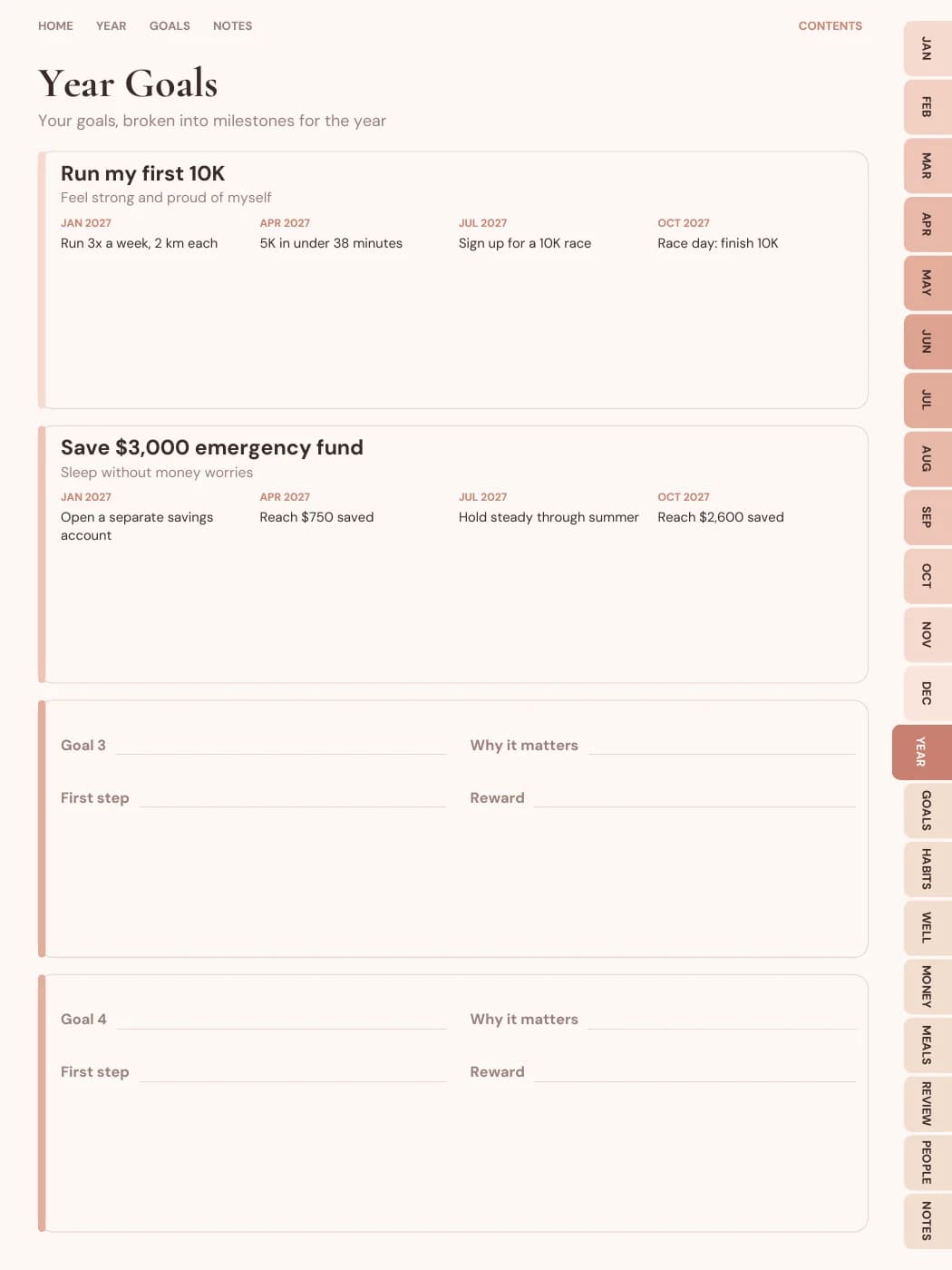
These lines are from the sample planner pictured above, for the goal “Run my first 10K”, with the reason “Feel strong and proud of myself”. The goals page shows four of the twelve milestones:
| Month | Milestone |
|---|---|
| January 2027 | Run 3x a week, 2 km each |
| April 2027 | 5K in under 38 minutes |
| July 2027 | Sign up for a 10K race |
| October 2027 | Race day: finish 10K |
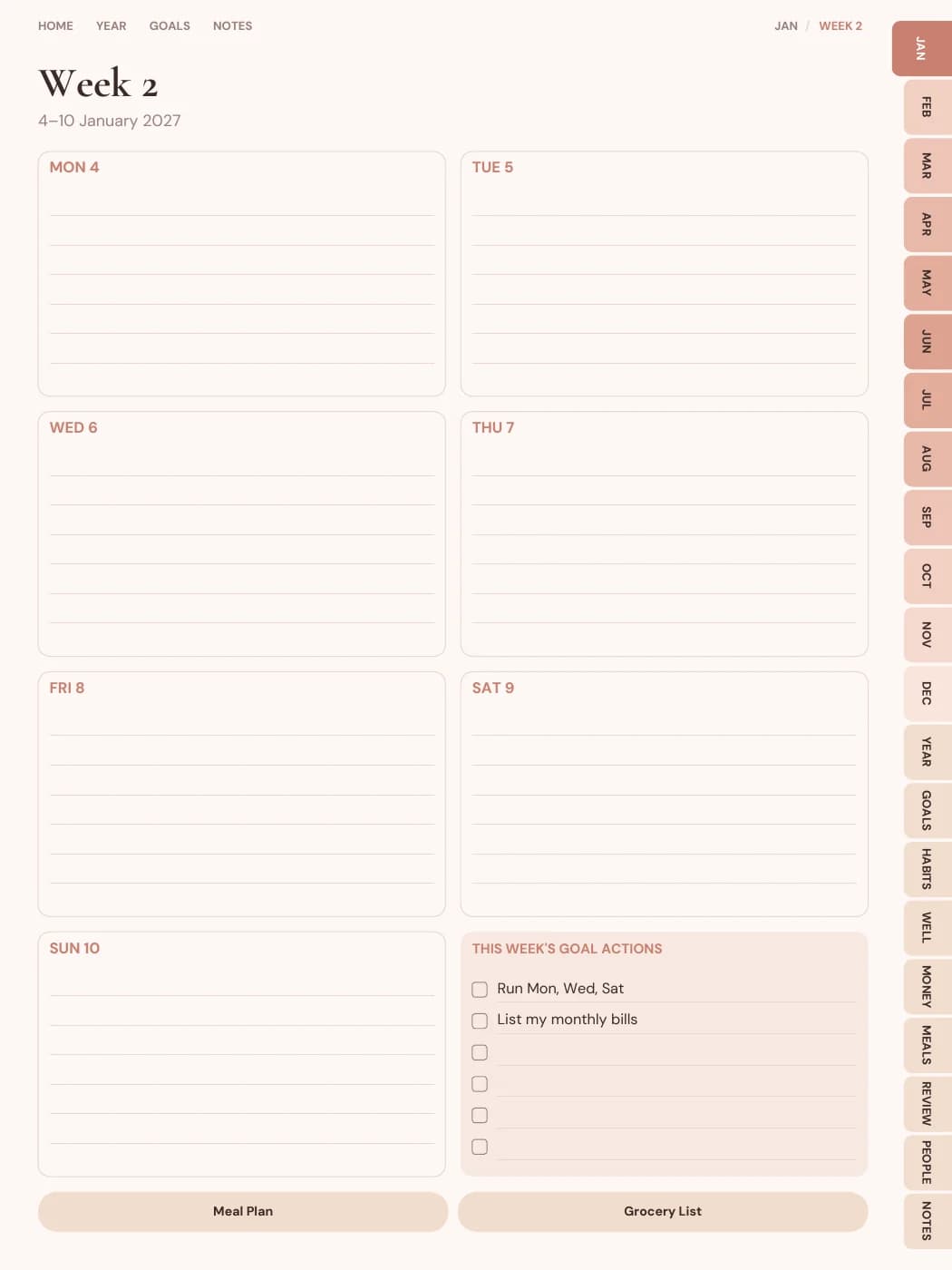
The week of 4–10 January gets the action “Run Mon, Wed, Sat”, and every other week gets its own. January's month page opens with the motto “Small steps, every single day.”
Where the plan appears
- Goals page: each goal with its reason and milestones.
- Month pages: that month's milestones in a “Focus this month” list, with the motto under the title.
- Week pages: “This week's goal actions”, each with a checkbox.
- Outside the PDF: the same milestones and actions can go to Google Calendar, Apple Calendar or Notion.
Goals that plan well
- Be specific. “Save $3,000 for an emergency fund” plans better than “be better with money”.
- Add a deadline if there is one. The plan works back from it.
- Add a reason. It's printed on the goals page, which helps on weeks when motivation dips.
- Pick the few that matter. Six is the maximum; three is easier to keep. Our goal-setting guide goes deeper.
Device notes.
GoodNotes and Notability
The plan is printed text, so you can write around it, highlight it and tick the boxes with your pen.
Samsung Notes and Android
The same pages in Android portrait or landscape sizes, with the same plan on them.
E-ink tablets
Printed text stays crisp in greyscale. The E-ink format uses higher contrast for reMarkable, Kindle Scribe and Boox.
Printables
Print the planner and the plan comes with it, on A5, A4, US Letter or Half Letter.
Questions people ask
What is an AI goal planner?
A planner where AI turns each of your goals into smaller, dated steps. Here, that means a milestone for every month and an action for every week, printed on the pages of a hyperlinked PDF planner you can write in.
Which AI do you use?
Google's Gemini API. Only the goal text you type, plus basic details like the planner type, start month and length, is sent. Your name, email and account details are not.
Is it free?
Planning goals and previewing the planner are free, within the daily limits. Downloading the planner is $12, or included in Pro and Seller.
What if I don't like the plan?
Edit any line by hand, change your goals and plan again, or remove the plan from your pages entirely.
What happens if the AI service is down?
You get a simpler built-in plan with the same structure, which you can edit. Try again later for an AI-written one.
Does it work with undated planners?
Yes. Milestones are labelled Month 1, Month 2 and so on instead of calendar months.
Related
Type a goal. Get a year of steps.
Plan up to six goals, edit the milestones, and flip through the whole planner before you pay.
Plan my goals